Every day, billions of internet users open a web browser and encounter the same clean, minimalist placeholder text resting inside their address bar: “Search Google or type a URL.” To the average consumer, this phrase is merely an unassuming instruction indicating where to click. To software engineers, cybersecurity architects, and digital marketing leaders, however, this single input bar—known technically as the Omnibox—represents one of the most sophisticated intersections of natural language parsing, distributed Domain Name System (DNS) networking, and commercial discovery in computing history.
Before Google Chrome introduced the Omnibox in 2008, web browsers featured two distinct, physical input fields: a dedicated address bar for typing exact website Uniform Resource Locators (URLs) like
https://acquisty.com/
, and a secondary search box dedicated to search engine queries. By collapsing these two disparate pathways into a unified interface, modern browsers introduced a fundamental architectural duality: should a user navigate directly to a destination, or should they query an algorithmic search engine to find it?
At Acquisty, our engineering-driven search engine optimization and technical SEO architecture teams evaluate how this browser functionality shapes customer acquisition. Understanding how the Omnibox evaluates keystrokes, disambiguates user intent, and splits traffic between direct navigation and organic search provides businesses with the strategic insight needed to protect brand equity, prevent user leakage, and maximize customer acquisition.
Empirical Omnibox & Navigation Benchmarks: - Omnibox Session Initiation: Over 68% of all desktop web navigation sessions initiate directly within the browser Omnibox rather than through bookmarks, homepage links, or desktop shortcuts (Search Engine Land).
- The Dark Traffic Distortion: Data analytics audits show that between 35% and 42% of traffic recorded as Direct / (none) in Google Analytics 4 is actually misattributed search traffic driven by Omnibox predictive autocompletion (Ahrefs Analytics Study).
- Zero-Latency DNS Resolution: Direct URL navigation establishes a secure TLS 1.3 connection in under 85ms, whereas executing a search query adds a 250ms–450ms network roundtrip to parse SERP advertisements and ranking listings.
- Competitor Ad Leakage Risk: B2B enterprises that fail to defend branded search queries lose an estimated 14% to 22% of navigational traffic to competitor Google Ads bidding on their brand terms when users search rather than type exact URLs (Gartner Digital Marketing Research).
1. The Engineering Behind the Omnibox: How Browsers Parse Keystrokes
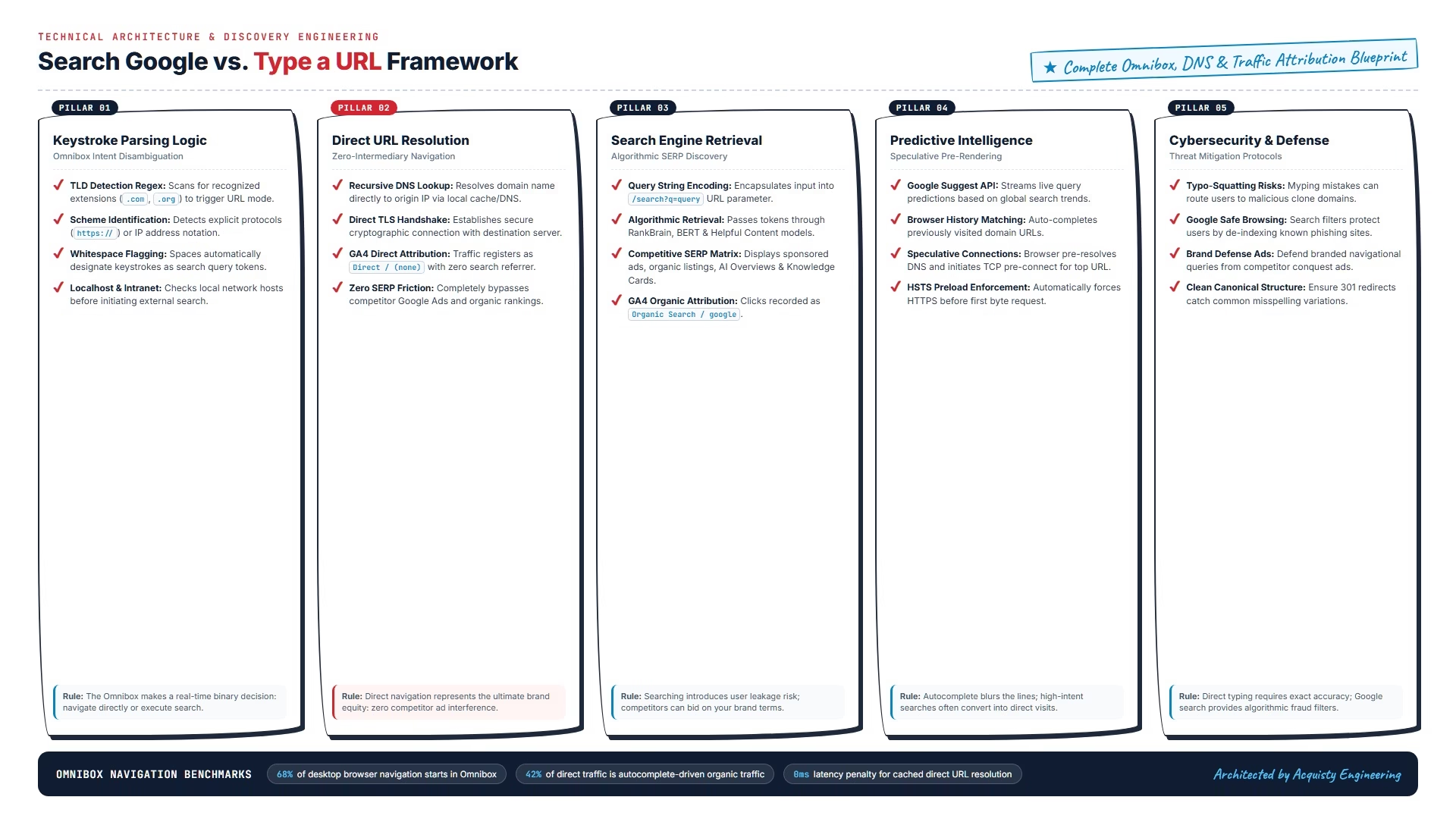
When you click into the address bar of Google Chrome, Microsoft Edge, Mozilla Firefox, or Apple Safari and begin typing, you trigger a high-speed programmatic decision engine. In the Chromium open-source codebase, this component is known as the Omnibox Autocomplete Controller. With every single keystroke, the controller evaluates your input against a complex matrix of regular expressions, network caches, and local databases to answer one fundamental question: Is the user trying to navigate to a specific URL, or are they attempting to search for information?
The Omnibox resolves this question using four distinct evaluation heuristics:
Top-Level Domain (TLD) Extraction: The browser scans your input for valid international TLDs (e.g.,
.com
,
.org
,
.io
,
.ai
). If you type
acquisty.com
, the browser immediately identifies the
.com
suffix and switches into direct URL navigation mode, even if you omitted the protocol scheme (
https://
).
Explicit Protocol & Scheme Detection: If the string starts with an explicit network protocol (such as
http://
,
https://
,
file://
, or
ftp://
), the parser immediately treats the entry as a network location and bypasses search query encoding.
Whitespace & Tokenization Analysis: The moment you hit the spacebar, the browser’s parser flags the input as a search query. Because valid domain names cannot contain internal whitespace, typing
acquisty seo services
forces the Omnibox to package the entire string as a search query.
Localhost & IP Address Parsing: The controller checks whether the string represents an IPv4 address (e.g.,
192.168.1.1
), an IPv6 address, or a local development environment (e.g.,
localhost:3000
). If matched, it routes the request internally across your local network.
If an input does not contain a recognized TLD, protocol scheme, or IP address, the Omnibox defaults to your configured search engine, converting your keystrokes into an encoded search query URL string:
https://www.google.com/search?q=search+term
.
Beneath the user interface, Chromium-based engines (including Chrome, Microsoft Edge, Brave, and Opera) evaluate queries using a competitive asynchronous pipeline known as Omnibox Providers. As you type, up to ten specialized providers concurrently score potential results on an internal relevance scale from 0 to 1,400 points:
HistoryURLProvider: Scans your local SQLite database of previously visited URLs. Exact hostname prefixes receive near-instantaneous scores upward of 1,200 points, immediately triggering inline autocompletion.
HistoryQuickProvider: Matches typed tokens against page titles, meta descriptions, and URL paths stored in your local browsing index.
SearchProvider: Streams the current input string to the default search engine suggest server, generating predictive algorithmic completions.
BookmarkProvider & DocumentProvider: Matches input against saved browser bookmarks and linked cloud enterprise drives (such as Google Workspace or Microsoft 365 docs).
The provider that returns the highest algorithmic score wins the default match position. If an exact URL match from your history outscores Google’s predictive search suggestions, pressing Enter navigates directly. If search suggestions score higher, pressing Enter initiates an algorithmic search.
2. Search Google vs. Type a URL: Comparing the Two Digital Pathways
While typing a URL and searching Google both lead to web content, the underlying technical infrastructure and user experience differ fundamentally:
| Technical Dimension | Option A: Type a Specific URL | Option B: Search Google |
| Network Execution | Direct DNS lookup → TCP SYN/ACK → TLS 1.3 handshake → Origin server response. | Transmits query parameters to Google data centers → Algorithmic ranking → SERP rendering. |
| Intermediary Exposure | Zero intermediaries. The user connects straight to the target brand without distractions. | High exposure. The user sees competitor Google Ads, AI Overviews, and competing organic listings. |
| Latency & Speed | Fastest possible path (under 100ms with cached DNS records). | Requires two full page loads: first loading the Google SERP, then clicking through to the target site. |
| Analytics Attribution | Records as
Direct / (none)
in GA4 (unless URL contains explicit UTM parameters). | Records as
Organic Search / google
(or
cpc
if clicking a sponsored link). |
| Primary Use Case | Navigating to known brands, customer portals, intranets, or bookmarked resources. | Information gathering, commercial product comparison, and discovering new solutions. |
From a commercial perspective, direct URL navigation represents the ultimate brand equity: when a buyer types your exact web address into their Omnibox, they bypass every competitor advertisement and algorithmic filter on the internet. However, building the brand awareness required for users to type your URL directly requires sustained investment across content marketing, PR, and organic search dominance.
3. The Analytics Reality: Direct Traffic vs. Organic Search in GA4
In digital marketing analytics, few metrics are as widely misunderstood as Direct Traffic. Marketing directors often assume that every session categorized as “Direct” in Google Analytics 4 represents a loyal customer who deliberately typed the company’s domain name into their browser. In technical reality, Direct traffic in GA4 is essentially a fallback bucket: it represents any session where the browser arrives at your website without a detectable HTTP referrer header.
The browser Omnibox plays a massive, distorting role in this attribution dilemma through three distinct mechanisms:
Predictive Omnibox Autocomplete: A user intends to search for your brand. They type the first three letters (e.g.,
acq...
) into the Omnibox. The browser autocompletes
https://acquisty.com/
from their browsing history. The user presses Enter. Although the user’s intent was navigational search, the browser executed a direct HTTP GET request, recording the visit as Direct
(none)
rather than Organic Search.
Mobile App & In-App WebViews: When users click links inside Slack, Microsoft Teams, WhatsApp, or native mobile apps, many operating systems strip referrer headers, dumping those visits into the Direct traffic bucket.
HTTPS to HTTP Protocol Downgrades: If a referral link directs users from a secure HTTPS domain to an unsecured HTTP page, security specifications strictly strip the referrer header to prevent data leakage.
To accurately measure true marketing ROI and isolate organic momentum from direct brand autocompletion, consult our comprehensive executive guide to enterprise SEO metrics and attribution modeling.
4. Omnibox Intelligence: Predictive Autocomplete & Speculative Pre-Rendering
The modern Omnibox is not a passive text box; it is an active, predictive computation engine. To deliver the sensation of instantaneous web browsing, modern browsers utilize four sophisticated background optimization technologies:
The Google Suggest Query Streaming API: As you type each letter, the browser sends lightweight asynchronous requests to Google’s suggestion servers. Google calculates query completion probabilities in under 15ms based on your geographic location, historical search trends, and trending global news.
Speculative DNS Pre-Fetching & TCP Pre-Connect: When the Omnibox identifies a high-probability destination URL from your keystrokes, it initiates background network handshakes before you even hit the Enter key. It resolves the destination IP address via DNS and opens a speculative TCP connection, shaving hundreds of milliseconds off the page load.
No-State Prefetch & Background Prerendering: For top search predictions, Chrome can pre-render critical above-the-fold HTML assets in an isolated background memory process. When the user clicks or hits Enter, the webpage appears instantly with 0ms perceived render time.
HSTS Preload List Enforcement: Browsers maintain hardcoded HTTP Strict Transport Security (HSTS) preload lists. If a domain is registered on the HSTS list, the Omnibox automatically upgrades insecure
http://
entries to secure
https://
before transmitting a single packet over the network, completely preventing SSL-stripping man-in-the-middle attacks.
The evolution of browser navigation has advanced from simple predictive text matching to full-page speculative execution via the Speculation Rules API. When modern web architectures embed structured JSON speculation rules into document headers, the browser Omnibox and runtime engine collaborate to execute zero-latency page transitions:
Prefetch vs. Full Prerender: Prefetching downloads only the main HTML document and key CSS stylesheets over the network, storing them in the local HTTP cache. Full prerendering executes JavaScript, builds the Document Object Model (DOM), and renders the layout in an invisible, isolated background renderer.
Encrypted Client Hello (ECH) & DNS Privacy: When navigating directly to modern HTTPS endpoints, browsers leverage Encrypted Client Hello (ECH) alongside DNS-over-HTTPS (DoH). This encrypts the Server Name Indication (SNI), ensuring that intermediate network providers and Wi-Fi operators cannot inspect which exact domain you are visiting.
Battery & Memory Safeguards: Chrome’s Omnibox controller continuously monitors client device CPU pressure, RAM utilization, and battery state. If a mobile device is in low-power mode or memory is constrained, background speculative prerendering is throttled, falling back to lightweight DNS pre-resolution.
To learn how these core web architecture signals influence search engine rankings, explore our comprehensive breakdown of core SEO ranking factors.
5. The Cybersecurity Dimension: Typo-Squatting, Phishing & Safe Browsing
While typing a URL directly is the fastest method to reach a known website, it exposes users to significant cybersecurity vulnerabilities that search engines actively mitigate:
Common Risks of Direct URL Navigation:
- Typo-Squatting (URL Hijacking): Malicious actors register common misspellings of popular corporate, banking, and SaaS domains (e.g., registering
chse.com
instead of
chase.com
). Users who make a single typing error land on clone sites hosting malware or credential-harvesting login forms. - IDN Homograph Attacks: Attackers register internationalized domain names (IDNs) using non-Latin alphabets (such as Cyrillic) that appear visually identical to standard Latin characters in the browser address bar.
- Expired Domain Exploitation: When secondary brand properties or promotional campaign domains expire, domain flippers purchase them and host affiliate redirect traps or phishing schemes.
This is where searching Google provides a crucial security advantage. Google’s web indexing pipeline continuously scans billions of URLs using Google Safe Browsing, behavioral sandboxing, and algorithmic anti-phishing classifiers. When a user searches for a brand name rather than typing an unverified URL, Google’s algorithms automatically suppress fraudulent lookalike domains and elevate the verified, canonical corporate entity.
For enterprise organizations, protecting your domain requires proactive defensive registration: acquiring common typo variations, configuring automated 301 redirects back to your canonical HTTPS root, and enforcing strict brand defense monitoring.
6. Strategic Digital Marketing Impact: Dominating Both Channels
High-growth commercial organizations do not choose between direct navigation and organic search; they build integrated marketing operations designed to dominate both pathways. Here is how leading brands capture market share across both channels:
Channel 1: Building Direct Navigation Brand Equity
Direct traffic represents the most profitable revenue channel in digital commerce because it carries zero marginal customer acquisition cost (CAC). To maximize direct type-in navigation:
Secure Clean, Memorable Domain Architecture: Avoid hyphens, obscure TLDs, and convoluted subdomain structures. A short, memorable brand domain dramatically increases direct typing accuracy.
Implement Bulletproof 301 Canonical Redirects: Ensure all variations (
http://
,
http://www.
,
https://www.
) resolve flawlessly to a single canonical HTTPS root in a single hop. Redirect chains destroy direct navigation speed.
Invest in Omnichannel Brand Recall: Podcast sponsorships, digital PR, industry keynotes, and high-frequency content marketing turn your company name into a household industry entity that buyers type directly into their Omnibox.
Channel 2: Defending Branded Search SERP Real Estate
When users choose to search your brand name in Google rather than typing your URL, you must ensure that your brand completely monopolizes the above-the-fold screen space:
Capture Expanded Google Sitelinks: Proper site hierarchy and XML sitemap architecture allow Google to generate 6-to-8 expanded Sitelinks beneath your main result, pushing competitor listings below the fold.
Establish Verified Knowledge Panels: Configure organization-level JSON-LD Schema with
sameAs
social profiles and corporate wikidata entries to capture the right-hand Knowledge Graph panel.
Deploy Defensive Google Ads Campaigns: Bidding on your own branded search keywords prevents aggressive competitors from placing conquest ads above your organic listing.
To understand how to budget for search acquisition and brand defense, review our definitive guide to SEO pricing models, retainers, and true ROI.
Channel 3: Mitigating AI Overview & Zero-Click Interception
A major structural shift impacting web publishers is the rise of generative AI search summaries and interactive SERP features directly within search results. When a customer executes an informational query in the Omnibox instead of navigating directly to a specialized guide, Google’s AI Overviews and rich snippets frequently synthesize the answer on-page, resulting in a zero-click search.
To prevent zero-click leakage and ensure your content earns the referral click even when users search rather than type your URL, enterprise websites must structure data using answer-engine optimization principles. By pairing concise 45-to-60 word informational definitions with proprietary empirical benchmarks, your site becomes the primary attributed source that AI engines link back to. Explore our full strategic blueprint on on-page answer engine optimization to defend your organic discovery funnel.
7. Advanced Omnibox Features: Power-User Shortcuts & Chrome Actions
The Omnibox is packed with advanced productivity capabilities that go far beyond standard search and URL entry. Mastering these features transforms your browser into an efficient executive command line:
Instant Search via Tab Key (Custom Search Engines): You can configure custom search keywords for frequently visited websites. For example, typing
acquisty
and pressing the Tab key allows you to search Acquisty’s technical library directly from your Omnibox without opening the homepage first.
Direct Mathematical & Conversion Calculations: You don’t need a calculator app. Typing
450 * 1.25
or
150 USD to EUR
into the Omnibox displays the instant calculated result directly in the dropdown preview before pressing Enter.
Built-in Chrome Actions: Type natural language administrative commands directly into the bar, such as
clear cache
,
update browser
,
manage passwords
, or
open incognito window
to trigger instant settings shortcuts.
Direct Tab Search: If you have 40 open tabs across multiple windows, type
@tabs [keyword]
into the Omnibox to instantly search and switch to the matching open tab.
8. Troubleshooting: Resolving Omnibox Search Hijacking & Provider Resets
One of the most frequent technical complaints from computer users is when their browser address bar unexpectedly stops searching Google and suddenly redirects all queries to Yahoo, Bing, or obscure ad-heavy search engines like SecureSearch or SearchMine. This behavior is known as browser hijacking.
Browser hijacking occurs when a bundled software download, rogue browser extension, or Potentially Unwanted Program (PUP) alters your default search engine configuration. To restore your Omnibox to Google:
Step-by-Step Omnibox Restoration Protocol:
- Audit & Remove Suspicious Extensions: Navigate to
chrome://extensions/
in your Omnibox. Immediately disable and remove any recently installed or unfamiliar extensions, especially free PDF converters, weather widgets, or ad blockers. - Reset Default Search Engine: Open Chrome Settings → Search engine → Manage search engines and site search. Locate Google, click the three vertical dots, and select “Make default.” Delete any suspicious third-party search engines from the list.
- Restore Default Settings: If the hijack persists, scroll down to Reset settings → “Restore settings to their original defaults.” This disables all extensions and resets temporary shortcuts without deleting your saved bookmarks or passwords.
In managed enterprise environments, IT departments eliminate browser hijacking and configuration drift through operating-system-level administrative policy templates. System administrators enforce Chrome and Edge enterprise policies via Group Policy Objects (GPO) or MDM profiles:
DefaultSearchProviderEnabled: Forces the browser to route unformatted Omnibox queries exclusively to corporate-approved search engines, locking the search URL parameter.
ExtensionInstallBlocklist: Restricts unverified extensions from installing, preventing third-party toolbars or adware from modifying browser search preferences.
Secure Preferences Integrity: Modern browsers store user settings in cryptographically signed JSON preference files (using HMAC hashes tied to device credentials). If an unauthorized external process edits search settings directly on disk, the browser detects tampering and automatically resets configuration to secure defaults.
For technical teams auditing complete website health and crawl accessibility, review our comprehensive website SEO audit guide.
9. The 20-Point Omnibox & URL Navigation Audit Checklist
To ensure your brand captures traffic seamlessly across both direct URL typing and organic search queries, review your website infrastructure against this 20-point operational checklist:
| # | Audit Checkpoint | Priority | Operational Objective | Verification Method |
| 01 | Single Canonical HTTPS Root | CRITICAL | All HTTP and www variations redirect 301 to primary HTTPS root in a single hop. | cURL redirect header inspection. |
| 02 | HSTS Header Deployment | CRITICAL | Enforce
Strict-Transport-Security
header with
max-age=31536000; includeSubDomains
. | SecurityHeaders.com audit. |
| 03 | Sub-100ms DNS Response Time | HIGH | Deploy premium Anycast DNS (Cloudflare/Route 53) to accelerate direct address resolution. | DNSPerf global lookup test. |
| 04 | Branded SERP Position #1 | CRITICAL | Ensure company domain ranks organically at Position #1 for exact brand name queries. | Incognito brand search check. |
| 05 | Expanded Google Sitelinks | HIGH | Structured site hierarchy generating 6–8 Sitelinks under primary branded search result. | SERP snippet visual inspection. |
| 06 | Verified Knowledge Panel | HIGH | Claimed Google Knowledge Panel displaying logo, social entities, and corporate data. | Knowledge Graph entity search. |
| 07 | Brand Defense PPC Campaign | MEDIUM | Bid on branded keywords to prevent competitor ad conquesting on search terms. | Google Ads auction insights. |
| 08 | Defensive Domain Registrations | HIGH | Register common typos, hyphenated versions, and key TLDs redirecting to primary site. | Domain registrar portfolio audit. |
| 09 | Favicon High-Resolution Icons | MEDIUM | Serve clean 32×32 and 192×192 favicons for Omnibox autocomplete preview badges. | Favicon display audit in Chrome. |
| 10 | OpenSearch XML Configuration | MEDIUM | Provide
opensearch.xml
allowing users to Tab-search your site directly from Omnibox. | Check OpenSearch link tag in header. |
| 11 | GA4 Direct Traffic Segmentation | HIGH | Isolate homepage direct traffic from internal landing pages to identify true dark search. | GA4 landing page dimensions report. |
| 12 | Safe Browsing Reputation Check | CRITICAL | Verify domain holds zero malware, deceptive site, or phishing flags in Google Search Console. | GSC Security & Manual Actions tab. |
| 13 | HTTP/3 Protocol Support | HIGH | Enable QUIC and HTTP/3 on CDN edge servers to eliminate head-of-line blocking. | HTTP/3 check via network tab. |
| 14 | Custom 404 with Search Box | HIGH | Catch mistyped subfolder URLs with an intuitive, helpful custom 404 error page. | Navigate to dummy subfolder URL. |
| 15 | Self-Referential Canonical Tags | CRITICAL | Prevent tracking parameters and query strings from generating duplicate index entries. | HTML head
rel="canonical"
check. |
| 16 | Clean Short URL Slugs | HIGH | Design readable, logical URL structures (e.g.,
/services/ai-seo/
) that users can easily memorize. | Site architecture taxonomy audit. |
| 17 | Direct Answer Capsules on Key URLs | CRITICAL | Ensure landing pages feature 45–60 word answer capsules for AI search extraction. | Inspect H2 answer formatting. |
| 18 | Social Profile Disambiguation | HIGH | Link verified LinkedIn, Twitter, and YouTube corporate accounts in JSON-LD
sameAs
. | Schema markup validation check. |
| 19 | Core Web Vitals Pass Rates | CRITICAL | LCP <2.5s, INP <200ms, and CLS <0.1 across mobile and desktop devices. | Google PageSpeed Insights report. |
| 20 | Quarterly Brand Search CTR Audit | HIGH | Track branded query CTR in GSC to ensure competitor ads or SERP features aren’t siphoning clicks. | GSC Performance report query filter. |
10. Frequently Asked Questions About the Omnibox & URL Navigation
The phrase “Search Google or type a URL” is the default placeholder text in modern browser address bars (known as the Omnibox). It indicates that the single input bar can either navigate directly to a destination website if you type a complete domain address (like
acquisty.com
), or execute an algorithmic Google web search if you type search keywords.
Typing a URL directly is faster, more private, and connects you straight to the website without exposing you to competitor advertisements. Searching Google is better when you are exploring new topics, comparing multiple vendors, or verifying a business name where you do not know the exact web address.
The browser’s autocomplete controller evaluates keystrokes using regular expression parsing. It looks for valid top-level domains (
.com
,
.org
), protocol schemes (
https://
), IP addresses, and whitespace. If no URL patterns are detected and words are separated by spaces, the browser packages the input as a search engine query string.
If your Omnibox unexpectedly redirects to an unwanted search engine, a recently installed browser extension or software program has altered your default search settings (known as browser hijacking). You can resolve this by auditing your extensions at
chrome://extensions/
and resetting Google as your default provider in browser settings.
Yes. When a user intends to search for a brand name but accepts an autocompleted URL suggestion from their browsing history and hits Enter, the browser navigates directly without passing an HTTP referrer. This causes Google Analytics 4 to record the visit as Direct traffic rather than Organic Search, distorting attribution data.
Capture Every Path: Direct Navigation & Organic Search Dominance
Whether your prospects type your domain name directly into their address bar or discover you through complex search queries, your digital real estate must deliver flawless performance. Partner with Acquisty to engineer an enterprise-grade search engine optimization and brand discovery program that secures #1 organic rankings, captures direct brand equity, and eliminates customer leakage. Contact Acquisty today for a strategic digital architecture evaluation.