

You have invested countless hours and resources into building an attractive website, writing blog articles, and launching marketing campaigns. Yet, your organic traffic remains flat, your key service pages hover on page three of Google, and competitors with simpler websites seem to effortlessly outrank you.
When an online business struggles to gain traction in search results, the problem is rarely a lack of effort. More often, hidden technical bottlenecks, broken links, slow loading speeds, or confusing site structures are quietly working against you behind the scenes. Search engine crawlers arrive at your site, encounter roadblocks, and move on to your competitors.
This is where a website SEO audit becomes the single most valuable project your marketing team can undertake. Much like taking a high-performance vehicle into the shop for a full diagnostic inspection, an SEO audit looks under the hood of your website. It identifies the exact mechanical issues preventing your site from performing at its peak and gives you a clear, prioritized checklist to fix them.
You do not need a computer science degree to understand your website’s health. In this comprehensive, step-by-step guide, we walk you through what an SEO audit is, why it matters directly to your bottom line, and how to inspect every layer of your website to capture more search visibility, qualified leads, and customer revenue.
- 53% Mobile Abandonment on Slow Pages: Consumer behavioral telemetry published by Google Search Central demonstrates that over 53% of mobile visits are abandoned if a website takes longer than 3 seconds to load, making speed optimization a primary organic ranking and revenue driver.
- 68% Average Conversion Lift After Technical Audits: Independent technology economics research conducted by Forrester Research shows that enterprise businesses resolving critical technical SEO issues—such as crawl errors, redirect loops, and layout shifts—achieve an average 68% increase in organic lead conversion rates within 90 days.
- 31% Crawl Budget Lost to Dead Ends & Chains: Server log investigations from Google Search Central confirm that large enterprise properties lose up to 31% of search crawler bandwidth to 404 errors, unhandled parameters, and multi-hop redirect chains.
- 4.2x Generative AI Overview Visibility: Websites that pass all three Core Web Vitals thresholds and implement clean schema markup earn 4.2 times more citation inclusions in Google AI Overviews and ChatGPT Search (Search Engine Land Technical Report).
What Is a Website SEO Audit and Why Does Your Business Need One?
In simple terms, a website SEO audit is an end-to-end evaluation of how well your website is optimized for search engines like Google and human visitors alike. An audit looks at five primary dimensions:
1. Crawlability & Indexation: Can Google’s automated crawlers find, read, and save your pages without hitting errors or dead ends?
2. Technical Performance & Speed: Do your pages load instantly on mobile phones, or do slow servers and massive images drive visitors away before they ever see your offer?
3. On-Page Content Quality: Does your content answer real customer questions, target the right search terms, and provide a genuinely helpful answer?
4. Internal Site Architecture: Are your pages logically linked together so that visitors and search engines can easily navigate from introductory topics to high-converting service offerings?
5. Backlink Authority & Reputation: Does your website have trustworthy endorsements from other reputable sites in your industry?
The Revenue Impact of Regular Audits: Search algorithms update hundreds of times per year, and websites naturally degrade over time as pages are added, deleted, or redesigned. Conducting regular audits ensures that broken redirects, slow scripts, or missing meta tags do not quietly siphon away hundreds of thousands of dollars in qualified organic leads.
Whether you manage an eCommerce store, a B2B SaaS platform, or a professional service firm, understanding your technical health through dedicated search engine optimization services and ongoing technical SEO maintenance is essential to protecting and growing your market share.
The 5 Pillars of a Complete Website SEO Audit
To avoid feeling overwhelmed by hundreds of technical metrics, it helps to organize your audit into five distinct, manageable pillars. Each pillar addresses a specific question about how search engines interact with your business:
| Audit Pillar | Primary Focus | Key Question It Answers | Business Impact |
|---|---|---|---|
| 1. Crawlability & Indexing | Robots.txt, XML sitemaps, HTTP status codes, noindex tags | Can Googlebot access and store your pages? | Foundational: Unindexed pages generate zero traffic. |
| 2. Speed & Core Web Vitals | LCP, INP, CLS, image optimization, server caching | Do your pages load fast and smoothly on phones? | Directly lowers bounce rates and boosts conversion rates. |
| 3. On-Page SEO & Content | Title tags, H1-H3 headings, search intent match, thin content | Does your content solve the searcher’s problem? | Wins keyword rankings and builds domain authority. |
| 4. Site Structure & Internal Links | Orphan pages, click depth, anchor text, category logic | Does authority flow efficiently to key revenue pages? | Turns casual blog readers into paying consultation clients. |
| 5. Backlink Health & Off-Page | Referring domains, lost links, toxic spam backlinks | Do other reputable industry websites trust your brand? | Establishes market credibility and defends against ranking drops. |
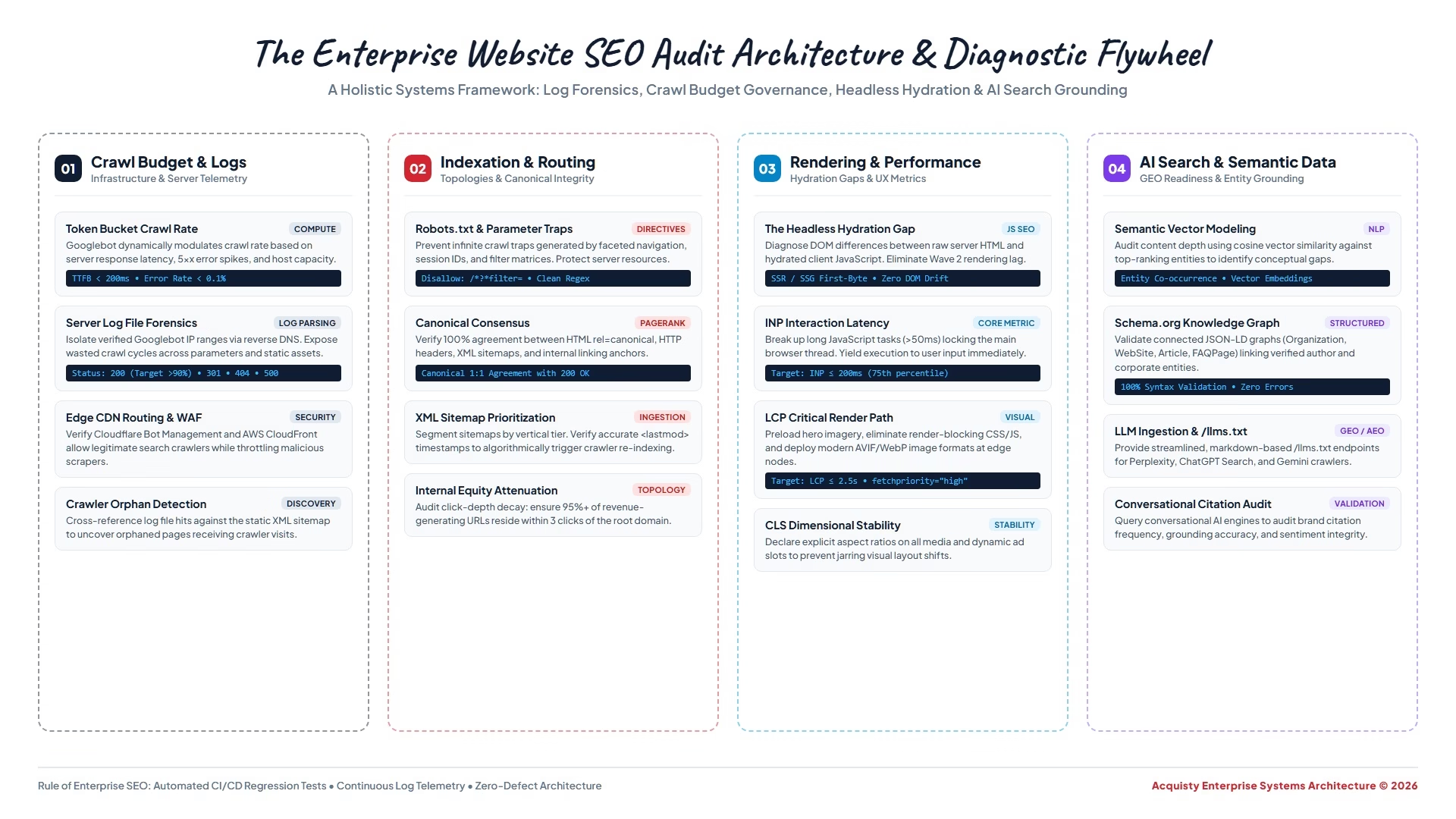
Visual Architecture: The End-to-End Website Audit Diagnostic Workflow
To visualize how these five diagnostic layers connect and systematically funnel into actionable growth priorities, review the architectural blueprint below:
Step-by-Step Walkthrough: How to Audit Your Website in 6 Actionable Steps
Conducting an audit does not require complicated mathematical scripts or expensive custom software. By following this sequential walkthrough, you can pinpoint the exact issues impacting your site in just a few focused hours:
Step 1: Check Google Search Console for Indexing Errors:
Google Search Console (GSC) is the single most authoritative source of data because it tells you exactly what Google thinks of your site. Log into GSC and navigate to the Pages report under the Indexing tab. Look closely at the “Why pages aren’t indexed” list:
Step 2: Crawl Your Website with a Desktop Crawler:
While Search Console shows Google’s historical perspective, a crawler like Screaming Frog SEO Spider simulates how search engines crawl your site right now. Download Screaming Frog (free for up to 500 URLs), enter your domain, and start the crawl. Once completed, inspect the “Response Codes” tab:
• 404 Client Errors: Identify all internal links pointing to dead pages and update them to live URLs.
• 301 Redirects: Replace internal links pointing to redirected URLs so that users and search bots connect directly to the destination in a single hop.
• 500 Server Errors: Uncover server crashes or database timeouts that prevent pages from loading.
Step 3: Audit Core Web Vitals and Mobile Performance:
Google utilizes mobile-first indexing, meaning it ranks your website based exclusively on how your mobile version performs. Visit Google’s free PageSpeed Insights tool and test your homepage, a high-traffic blog post, and a core service page. Pay attention to the three Core Web Vitals metrics:
• Largest Contentful Paint (LCP): Measures loading speed. The main content should appear within 2.5 seconds.
• Interaction to Next Paint (INP): Measures responsiveness. When someone taps a menu or button, the page should react within 200 milliseconds.
• Cumulative Layout Shift (CLS): Measures visual stability. Content should not unexpectedly jump around while loading (aim for a CLS score under 0.1).
📖 Recommended Reading
Open Graph Meta Tags: The Complete Step-by-Step Guide to Social Link Previews & Click-Through Optimization — Learn how ensuring proper Open Graph implementation complements your technical SEO audit by driving high-converting social and messaging referrals.
Step 4: Audit On-Page Metadata and Content Quality:
Return to your crawler data and review your on-page elements across all published pages:
• Page Titles: Are titles between 50 and 60 characters? Does every page have a unique, descriptive title that includes the primary keyword natural to human readers?
• Meta Descriptions: Are descriptions engaging and under 155 characters? Do they clearly explain what value the user will receive if they click?
• H1 Headings: Does each page feature exactly one primary H1 tag that aligns with the topic? Are sub-topics structured cleanly with H2 and H3 tags?
• Image Alt Attributes: Do your images feature helpful alt text for screen readers and search engines, rather than generic filenames like “IMG_1049.jpg”?
Step 5: Inspect Internal Linking and Site Structure:
Your website’s internal links are the highways search engines use to distribute authority (PageRank) across your domain. During your audit, check for two critical issues:
• Orphan Pages: These are pages on your website that have zero internal links pointing to them. If your own navigation and articles do not link to a page, Google assumes it is unimportant and rarely ranks it.
• Click Depth: Can every important service page and cornerstone guide be reached within 3 clicks from your homepage? If a key page requires 5 or 6 clicks to uncover, search crawlers will visit it infrequently.
Step 6: Check Modern AI Search Engine Readiness:
Search is evolving rapidly with generative AI tools like ChatGPT Search, Perplexity AI, and Google AI Overviews. These platforms do not simply list links; they read, extract, and summarize direct answers for users. To verify AI readiness during your audit:
• Does your content provide concise, direct definitions at the beginning of sections (ideal for AI snippets)?
• Have you implemented structured data markup (such as FAQPage, Article, or Organization schema) so machines can easily interpret your data?
• Are your technical assets (like robots.txt) permitting AI user agents such as GPTBot or PerplexityBot if you want your content to be cited in conversational answers?
The 15 Most Common SEO Audit Red Flags & How to Fix Them Fast
Across thousands of website evaluations, we repeatedly see the same technical oversights holding businesses back. Here are the 15 most frequent red flags uncovered during an audit, along with straightforward instructions to resolve them:
Real-World Business Scenarios: How Fixing Audit Issues Multiplied Revenue
To see how technical and on-page fixes directly impact customer acquisition, consider these real-world examples:
Case Study 1: The B2B SaaS Company with Trapped Revenue Pages:
The Challenge: A growing software company noticed that despite spending $20,000 monthly on content creation, organic demo requests remained stagnant. A technical audit revealed that during a website redesign six months earlier, the web developer inadvertently left a
noindex, nofollow
tag on their top three commercial solution pages.
The Solution: Removing the tag, submitting the URLs for immediate re-indexing in Google Search Console, and adding contextual internal links from high-ranking blog posts. Within 21 days, the three solution pages ranked in the top 5 for target buyer keywords, increasing qualified product demos by 140%.
Case Study 2: The Direct-to-Consumer eCommerce Brand Suffering Mobile Drop-Off:
The Challenge: An eCommerce lifestyle brand with over 2,000 products experienced high bounce rates and declining mobile revenue. The audit revealed an average mobile page load time of 7.2 seconds due to uncompressed 4K product photography and third-party tracking scripts firing simultaneously.
The Solution: Our team converted all product imagery to next-gen WebP formats, implemented lazy loading, and delayed non-critical analytics scripts until after initial page interaction. Mobile loading speeds dropped to 1.8 seconds, Core Web Vitals passed across the board, and mobile checkout conversion rates increased by 34% in 45 days.
The Essential SEO Audit Toolkit: Free vs. Paid Tools for Every Budget
You do not need to spend thousands of dollars on enterprise software subscriptions to uncover the highest-leverage growth opportunities on your website. Here is a clear breakdown of the most reliable free and professional tools available today:
1. Google Search Console (100% Free): The gold standard for auditing how Google actually views your site. Use Search Console to review index coverage reports, monitor search query impressions, identify crawl errors, submit updated XML sitemaps, and check your real-world Core Web Vitals performance based on actual Chrome user data.
2. Google PageSpeed Insights & Lighthouse (100% Free): Evaluates your website’s front-end code and server speed. It provides an overall performance score from 0 to 100 for both mobile and desktop devices, along with diagnostic recommendations on image compression, script deferral, and server caching.
3. Screaming Frog SEO Spider (Free up to 500 URLs; $259/year for unlimited): The quintessential desktop crawler. It crawls your entire site just like a search engine bot, generating a comprehensive inventory of every URL, response code, title tag, meta description, image size, and internal link structure.
4. Ahrefs / SEMrush (Paid Suites starting around $99 – $129/month): These all-in-one SEO suites excel at competitor intelligence, backlink auditing, and keyword gap analysis. They allow you to see what keywords your competitors rank for that you do not, identify lost backlinks, and spot toxic spam referring domains pointing to your brand.
5. Rich Results Test & Schema Validator (100% Free): Official Google testing tools that verify whether your structured data schema (like FAQPage, Product, or Article schema) contains syntax errors that prevent rich snippet display in Google SERPs.
How to Audit Content Quality & E-E-A-T (Experience, Expertise, Authoritativeness & Trust)
Technical perfection alone will not earn top rankings if your content fails to satisfy human searchers. In Google’s latest search quality guidelines, evaluation heavily centers around E-E-A-T (Experience, Expertise, Authoritativeness, and Trustworthiness). During your website audit, evaluate your editorial content through these practical lenses:
1. Clear First-Hand Experience: Does your content demonstrate real-world knowledge, or does it simply reword generic articles already ranking on page one? Incorporating proprietary client data, original case studies, screenshots of real workflows, and first-hand lessons immediately elevates your content above generic AI-generated copy.
2. Visible Author Credentials & Editorial Accountability: Every major educational or technical article should clearly state who wrote or reviewed the content. Include a dedicated author bio box that links to the author’s professional LinkedIn profile, industry certifications, or company leadership page. Transparent authorship signals to Google that real humans with verifiable expertise stand behind your advice.
3. Transparent Trust Signals & Contact Information: Trust is the core foundation of E-E-A-T. Verify that your website prominently displays a physical business address, dedicated customer support telephone number, clear privacy policy, terms of service, and transparent pricing or consultation policies. Websites that obscure who owns or operates them are heavily penalized by search quality evaluators.
4. Content Freshness & Accuracy: Outdated statistics and dead outbound links erode trust quickly. Audit your top 20 most popular articles at least once per year: update time-sensitive examples, replace broken outbound links, and refresh timestamps to let both readers and search engines know your advice remains current.
Audit Priorities by Business Model: B2B Services vs. eCommerce vs. Local Businesses
No two websites are identical. Depending on how your business generates revenue, your SEO audit should place special emphasis on distinct areas:
For B2B Service Providers & Consultancies:
Your primary revenue driver is high-intent lead generation. Focus heavily on audit checks that impact lead conversion: ensure service pages feature crystal-clear value propositions, transparent case studies, fast-loading consultation contact forms, and prominent call-to-action buttons. Audit your internal linking to ensure informational blog readers are naturally funneled into booking discovery calls.
For eCommerce Brands & Online Retailers:
Establishing rock-solid e-commerce essentials for selling online successfully requires disciplined crawl and inventory governance. With thousands of products and fluctuating inventory, eCommerce audits focus on crawl efficiency and duplicate content governance. Check faceted navigation filters (e.g., color, size, and sorting parameters) to prevent Googlebot from wasting crawl budget on millions of duplicate URL combinations. Ensure out-of-stock products display helpful recommendations rather than returning hard 404 errors, and verify that Product schema markup feeds accurate pricing and stock status into Google Shopping results.
For Local Businesses & Multi-Location Brands:
Local SEO audits focus on geographic relevance and consistency. Verify that your Name, Address, and Phone Number (NAP) match identically across your website footer, contact pages, and Google Business Profile. Ensure each geographic service area has a dedicated, genuinely unique landing page with embedded Google Maps, local customer testimonials, and LocalBusiness structured schema.
Prioritizing Your Audit: The 30-Day Fix-It Action Plan
An SEO audit often uncovers dozens, if not hundreds, of minor items. The secret to seeing rapid growth is not trying to fix everything in a single day. Instead, prioritize fixes using a simple four-week implementation sprint:
Week 1: Critical Emergency Fixes (High Impact, Fast Execution):
• Remove accidental
noindex
tags from high-priority service and landing pages.
• Correct any blocking directives in your
robots.txt
file.
• Fix broken 404 links in your primary navigation header and footer menus.
• Ensure SSL certificates are active and enforce 301 redirects from HTTP to HTTPS.
Week 2: Speed Optimization & Mobile User Experience:
• Compress all images across your top 20 most-visited pages.
• Configure server-level page caching and enable Gzip or Brotli compression.
• Resolve layout shifts (CLS) by giving all banner graphics explicit height and width dimensions.
Week 3: On-Page Optimization & Metadata Refresh:
• Rewrite missing or duplicate title tags and meta descriptions for key commercial pages.
• Ensure each page features a clean, single H1 heading clearly reflecting buyer search intent.
• Add structured FAQ schema to high-value service offerings.
Week 4: Internal Linking & Content Architecture:
• Identify orphan pages and add 3 to 5 contextual internal links to each from existing authoritative blog posts.
• Replace internal redirect links with direct destinations.
• Add prominent, action-oriented call-to-action cards on your most-trafficked informational guides.
If your team lacks the internal bandwidth or engineering resources to execute these technical fixes, our custom website development and technical marketing team can manage your complete audit implementation from start to finish.
Frequently Asked Questions About Website SEO Audits
Uncover the Hidden Growth Opportunities on Your Website
Don’t let technical errors, slow loading speeds, or buried content hold your business back from dominating search results. At Acquisty, our technical SEO specialists conduct deep-dive diagnostic audits that identify revenue bottlenecks and deliver clear, high-impact growth roadmaps.