

In the modern commerce ecosystem, your website is only half of your digital storefront. For local businesses, multi-location enterprises, healthcare providers, legal practices, hospitality venues, and regional commercial contractors, the single most critical asset determining daily phone calls, foot traffic, and revenue is your Google Business Profile (formerly known as Google My Business or GMB).
When high-intent consumers and corporate decision-makers search for local solutions—whether querying “commercial real estate advisors near me”, “top pediatric clinic in Mumbai”, or “enterprise IT services in London”—Google does not simply return organic web links. It prominently displays the Google Local Map 3-Pack, rich Knowledge Panels, and conversational AI Overviews that extract pricing, review sentiment, and business hours directly from verified Google Business Profiles.
However, creating and managing a profile today is vastly different from setting up a basic listing five years ago. Google has transitioned profile management directly into Google Search and Google Maps, deployed stringent AI-driven video verification protocols, and aggressively penalized profiles with duplicate categories or mismatched web citations.
Whether you are establishing a new commercial listing from scratch or seeking to optimize an existing profile to dominate the Google Map Pack, this definitive 2026 step-by-step master guide from Acquisty’s Local SEO engineering team covers everything you need to know.
- 76% Mobile Visit Velocity: Behavioral telemetry published by Think with Google indicates that 76% of consumers who search for a local business on mobile visit a store or office within 24 hours, and 28% of those searches result in an immediate purchase.
- 98% Consumer Review Reliance: Annual empirical data from the BrightLocal Local Consumer Review Survey confirms that 98% of consumers regularly read online reviews for local companies, with 87% checking Google reviews before initiating contact.
- 2.7x Trust Multiplier: According to official merchant data from Google Business Profile Help, businesses with complete, verified profiles are 2.7 times more likely to be considered reputable by consumers and capture 70% more foot-traffic visits.
The Modern Local Search Reality: More than 78% of local mobile searches result in an offline purchase within 24 hours. However, winning the coveted Google Map 3-Pack is no longer about stuffing keywords into your business name. In 2026, Google’s neural matching and AI Overviews evaluate physical proximity, real-time behavioral signals, review sentiment polarity, and verified entity consistency across the entire web.
1. What is a Google Business Profile & Why It Dictates 80%+ of Local Revenue
A Google Business Profile (GBP) is a free, core digital property provided by Google that allows business owners to manage how their commercial brand appears across Google Search, Google Maps, and Google Assistant.
Far beyond a simple static business directory listing, an optimized Google Business Profile acts as an interactive commercial conversion engine that delivers:
For multi-location brands and localized service firms across competitive metros like Mumbai, Delhi, and Bangalore, an optimized Google Business Profile is the highest-ROI organic customer acquisition asset in their digital marketing arsenal.
2. Pre-Requisites & Documentation Checklist Before Creating Your Profile
Before initiating the creation process in Google Business Profile Manager, assembling your exact corporate documentation prevents verification delays, automated rejections, and profile suspensions.
Ensure you have the following data assets prepared:
Important Compliance Notice: Never use virtual offices, co-working spaces without dedicated physical signage, or P.O. boxes for a physical storefront Google Business Profile. Google’s automated algorithmic sweeps routinely trigger instant “Hard Suspensions” on unverified co-working addresses. If you operate without a physical walk-in storefront, configure your profile strictly as a Service Area Business (SAB) with hidden address coordinates.
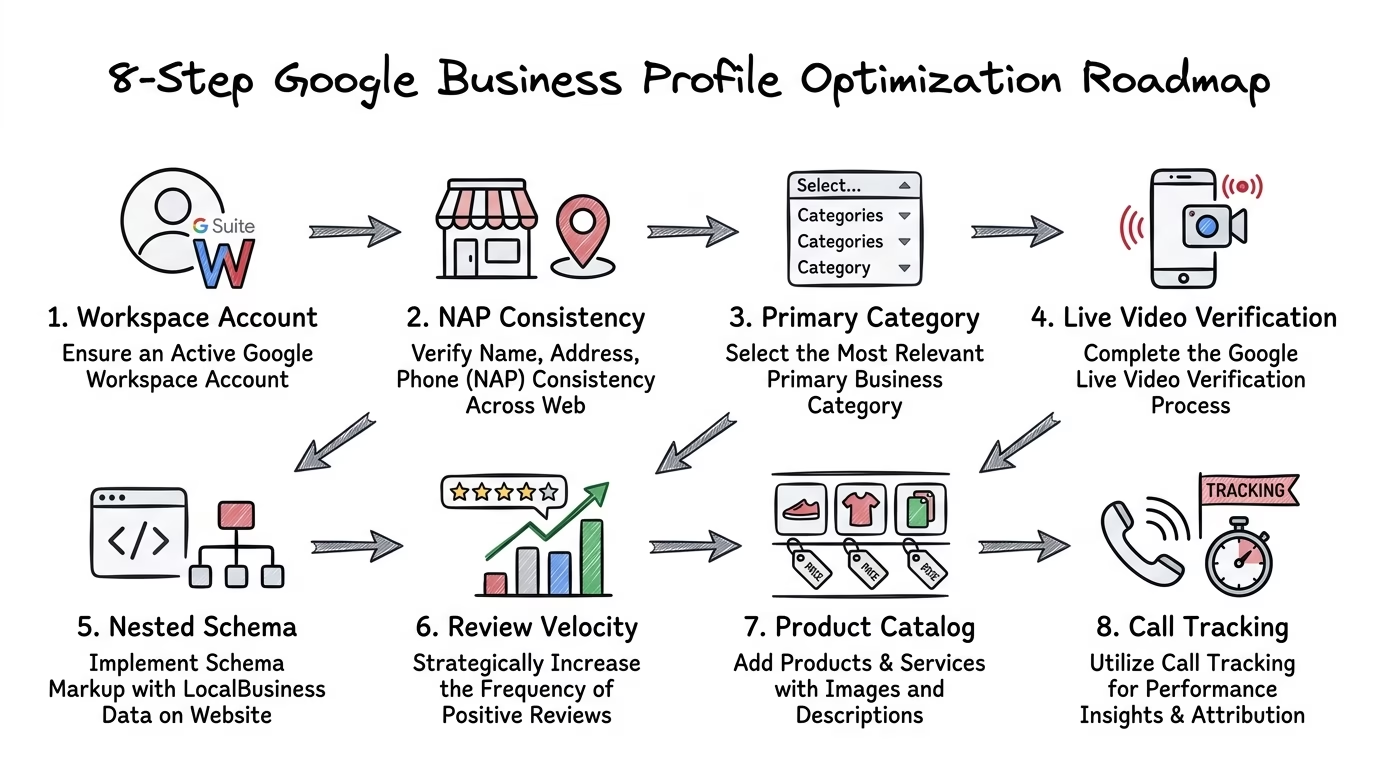
3. The Complete 8-Step Step-by-Step Guide to Creating a Google Business Profile
Follow this comprehensive step-by-step implementation walkthrough to create, configure, and claim your Google Business Profile with maximum authority:
Step 1: Sign in to Google Business Profile Manager
Navigate to google.com/business and sign in using your dedicated corporate Google Workspace account. Click on the “Manage Now” button to launch the business setup dashboard.
Step 2: Enter Your Exact Business Name & Check for Existing Claimed Listings
Type your exact commercial business name into the search bar. A dropdown will appear displaying existing listings matching your query.
If your business already appears (often generated automatically by Google Maps user submissions), select it to “Request Ownership” or claim the listing. If no existing match is found, click “Create a business with this name” to start fresh.
📖 Recommended Reading
Mastering Local GEO to Dominate the Map Pack in 2026 — An enterprise strategic playbook for local generative search optimization, geo-entity clustering, and map-pack visibility.
Step 3: Select Your Business Type (Storefront vs. Service Area vs. Online Retail)
Google will ask you to classify how you interact with your customers across three distinct business types:
Step 4: Choose Your Strategic Primary Business Category
Your Primary Category is the single most influential ranking factor in Google’s local search algorithm. It dictates which core search terms trigger your profile in the Map 3-Pack.
Select the most specific, accurate category matching your core revenue driver (e.g., choose “Corporate Law Firm” rather than generic “Lawyer”, or “Marketing Agency” rather than “Business Consultant”). You can add up to 9 secondary categories later, but your primary category carries over 70% of categorical ranking weight.
Step 5: Enter Your Exact Physical Location or Designate Service Areas
For storefront businesses, input your precise street address, suite/unit number, city, state, and postal code. Ensure your address formatting matches the exact syntax displayed on your official website development contact page.
Adjust the interactive map pin placement to ensure the red marker rests precisely over your building entrance rather than the general street center.
Step 6: Add Your Contact Information & Primary Website URL
Enter your local direct phone number and canonical website URL. For multi-location businesses, link the website field directly to the specific localized landing page (e.g.,
https://acquisty.com/seo-company-in-mumbai/
) rather than the generic homepage.
Step 7: Complete Google Profile Verification (The Modern Video Protocol)
In 2026, Google has largely phased out paper postcard verification in favor of Live Video Verification and instant mobile authentication. When prompted to verify, you will typically be required to record a continuous, unedited video using your smartphone that demonstrates three critical elements:
Step 8: Configure Core Services, Products & Business Description
Once verified, complete all secondary profile fields: input detailed descriptions for each individual service offering, populate your product showcase with high-resolution imagery and direct purchase links, craft a compelling 750-character business bio rich in natural entity terms, and upload high-resolution interior/exterior photography.
4. Advanced Advanced Optimization Framework for Dominating the Google Map 3-Pack
Simply having a verified listing is only table stakes. To consistently outrank local competitors across a wide geographic radius, deploy these advanced optimization protocols:
A. Category Correlation & Secondary Category Optimization
Audit the top 3 ranking competitors across all target search terms in your metropolitan centroid using local auditing tools. Identify the secondary categories shared by market leaders and add them to your profile. For instance, a premier digital agency should configure “Marketing Agency” as Primary, accompanied by “Internet Marketing Service”, “Website Designer”, and “Advertising Agency” as secondary classifications.
B. The NLP Review Velocity & Sentiment Engine
Google’s Natural Language Processing (NLP) models actively parse customer review text to identify entity keywords, service satisfaction, and location references. Profiles with consistent Review Velocity (receiving 3–5 authentic, detailed 5-star reviews weekly) routinely leapfrog competitors with older, static reviews.
Always reply to 100% of reviews within 24 hours, incorporating natural contextual keywords (e.g., “Thank you for choosing Acquisty for your enterprise SEO campaign in Mumbai!”).
C. Website Integration via LocalBusiness JSON-LD Schema Graphs
A Google Business Profile cannot rank in isolation; it requires authoritative validation from your primary website. Deploy nested
LocalBusiness
or specialized schemas (e.g.,
RealEstateAgent
for Real Estate SEO or
MedicalBusiness
for Healthcare SEO) incorporating:
5. Strategic Comparison: Basic Listing vs. Acquisty Local SEO Optimization
Examine how Acquisty’s engineering-driven local search framework outperforms standard agency practices:
6. Troubleshooting Common GBP Issues: Suspensions, Duplicates & Appeals
If your Google Business Profile experiences an unexpected algorithmic flag or suspension, follow this emergency recovery protocol:
7. Frequently Asked Questions (FAQ) About Google Business Profiles
8. Accelerate Your Local & Map Pack Dominance with Acquisty
Dominating local search today requires an integrated strategy combining verified Google Business Profile optimization, localized on-page SEO, technical schema engineering, and authoritative off-page citation building.
At Acquisty, our dedicated local search engineering team manages and scales enterprise Map 3-Pack visibility for single-location market leaders and national multi-location franchises. We eliminate suspensions, engineer high-converting review ecosystems, and connect local search rankings directly to measurable closed-won customer revenue.
Ready to dominate Google Maps and capture high-intent local buyers in your territory? Claim your free local SEO & GBP audit today or schedule a strategy consultation with our local search directors.
Accelerate Local Dominance & High-Intent Foot Traffic
Optimizing your Google Business Profile is the highest-ROI lever for capturing nearby high-intent buyers. Acquisty’s local search strategists engineer multi-location GBP architectures, localized entity citations, and review velocity systems that dominate local Map Packs.